User Guide

生物研究支援設施

概覽

User Account Registration

  • All HKU users must use HKU Portal ID to log in or create account for the PPMS online booking system. Please contact us at enquiry.cpos@hku.hk if you have any problems.
  • Users must be associated with their supervisor “Group” and attend training before making bookings.
  • Registration is subject to the PI/Supervisor’s consensus, whom should provide a valid payment account for settling usage charges.
  • User guides for the Online Booking System are available here for USER and SUPERVISOR respectively

Please contact enquiry.cpos@hku.hk or 2831-5500 for any question regarding account creation or login.

Training

  • Users must attend training offered by CPOS before booking and use of each instrument.
  • For monthly training schedules, please click HERE
  • Training requests should be submitted through PPMS, under  “Request” tab >  Select one of the forms under “Training Request”  and fill in accordingly. After submission of the training request, our staff will contact you in 3 working days.
  • Training is based on a first-come first-served policy. The training course is scheduled monthly and will be cancelled if no request is received one week before the scheduled date. Extra training session may be scheduled depending on the demand.
  • Training quotas are limited. Users should apply training only when their sample will be ready within 2 months of the training date, to avoid abuse of training quota.
  • During the training, users will learn the basic operation of the equipment; data acquisition and analysis.
  • Training will be conducted using a demo sample. If a user would like to bring his/her own sample for trial, please discuss with the trainer in advance.
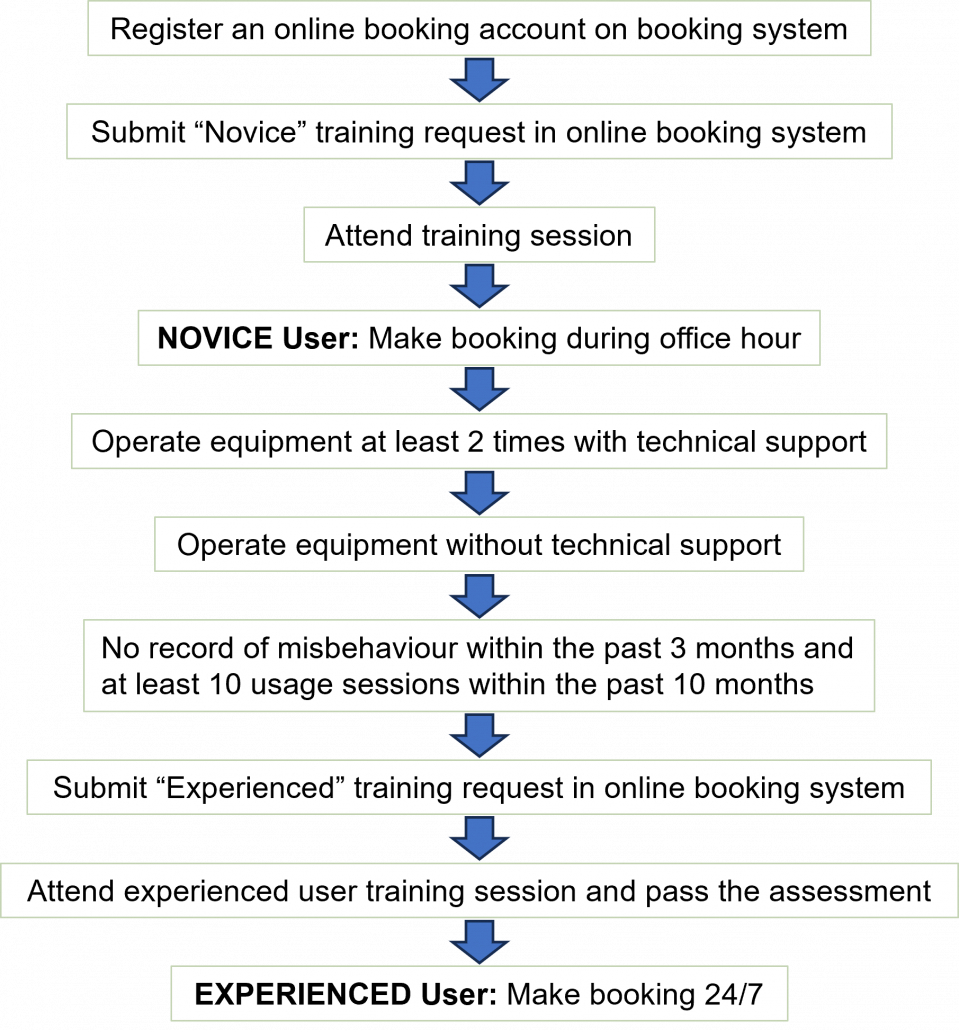
  • Upon completion of training, attendants will be classified as NOVICE user for this specific equipment in the online booking system. Novice user should review the training content and standard operation protocol to get familiar with the instrument. Novice user should request technical assistance during their first 2 booking sessions.

Booking

  • Booking is required for using any instruments, including computers for analysis software.
  • Booking should be made in the online booking system PPMS. Please refer to the user guide.
  • Each user must use his/her own account to make the booking and must be present for the instrument’s operation.
  • Users are classified into two levels: Novice and Experienced(Autonomous).  An assessment is required for an upgrade of user status.
  • Novice User: Office hours only; Technical support is on request; Same day booking is allowed.
    Experienced User: Booking during non-office hours (24h/7d) is allowed.
  • Booking can be made in advance of maximum 14 days.
  • Booking is based on 30-minute session. Users need to book for at least one session. Booking is limited to maximum of 20 hours per week, and maximum of 4 hours per day during office hours for flow equipment. User can contact corresponding technical staff under exceptional circumstances.
  • Cancellations should be made as early as possible but at least 24 hours before the scheduled booking.
  • User’s booking privileges may be downgraded or suspended if a total of 10 times or 20 cancelled hours are recorded within three months.
  • Users must inform the staff-in-charge during office hours of any experiment overrun beyond the booking time. Overrun will only be allowed if there is no overlapping booking. Users should book time slots through the online booking system by themselves for overrun of experiment beyond the scheduled time.

User Responsibility

  • Users should use the core’s instruments carefully and properly.
  • Users should read and follow the procedures in the standard operation protocol of instruments available at the equipment page.
  • Users are not allowed to move, remove, or reconfigure hardware/software settings without permission from corresponding staff-in-charge.
  • Users must sign on the log sheets after using the imaging instrument.
  • Users should keep the instrument station clean and tidy. Samples and other belongings should be removed.
  • Users should report problems related to the instrument in the logbook or to the staff-in-charge.

Transfer of Data Files

  • All data files generated from the instrument must be saved in local D/E/F drive in directory of: /Users/Department/PI/User Name
  • Users are not allowed to use USB devices on the computers directly connected to the equipment
  • All files must be transferred through Imaging and Flow Cytometry Core’s Data Transfer Server immediately after the use of instrument. User may follow guide for Data Uploading and downloading on FAQ page.
  • Users should disconnect from the server once data transfer is completed. Do NOT use the server for any other purpose.
  • Users should download the data from server as soon as possible, check the integrity of the downloaded data and then remove the data from the server.
  • Users should build their own data storage and back-up. The Core’s server is NOT for storage/back-up purposes.
  • Data files would only be kept in instrument computer for TWO weeks ONLY. Old data in equipment computer will be removed regularly.
  • Data files kept on server will be automatically deleted 30 days after the last modified date of the data files. IT team does not provide data recovery service.
  • Users can also download data using the computers (for data transfer or data processing) in the laboratory of the Core.

Registration for access to Data Transfer Server

Users can register to access the Data Transfer Server for CPOS Imaging and Flow Cytometry Core with the steps described below.

  1. Register on the user registration page http://ifcs.cpos.hku.hk/share-drive/create_user.php by any web browser.
  • Enter your HKU email address Only (uid@hku.hk or uid@connect.hku.hk), Do NOT use an email alias. Fill in your full name and password
  • Click ‘Register’ to submit. A confirmation email will be sent to your HKU E-mail account.
  1. Check your registered mailbox for email titled “CPOS Imaging and Flow Cytometry Core Network Server Account Registration Confirmation”.
  1. Complete the registration by clicking on the confirmation link in the email received.
  1. Follow the instructions in 常見問題 for using the server.

Safety and Security

  • User should wear gloves and lab coat when working with samples in CPOS’ labs. Other personal protective equipment (PPE) may also be used when appropriate.
  • No gloves should come into direct contact with computer accessories and with areas accessible to other personnel, including door handles and switches.
  • For imaging and sorting of samples with bio-hazardous materials (live virus or bacteria), please fill the biosafety form and contact the Lab Supervisor in advance.
  • User should be aware of the nearest fire escape route, emergency shower and first aid box.
  • Entry of unauthorized personnel (family, friends etc.) into Core’s lab is not allowed.
  • Drinking and eating are not allowed in all rooms.
  • All labs in the Core are under 24 hours surveillance.
  • User should be aware of Laser safety when using instrument equipped with high power laser. All eye or skin exposures to laser beam must be reported to the core’s staff and the Safety Office immediately.
  • Animal tissue or carcasses must be disposed at user lab but not in Core. Other biological waste and sharps could be disposed into a biohazard waste container or a sharp box respectively if transfer to user’s lab is not feasible.
  • The main entrance doors of Imaging and Flow Cytometry Core of CPOS must be kept locked at all times of non-office hours.
  • The last user of the day must turn off the light in the room and lock the doors.

Acknowledging the Bioresearch Support Core of CPOS

The Bioresearch Support Core of CPOS of the Li Ka Shing Faculty of Medicine is

jointly funded by the University Development Fund and the Faculty of Medicine. It is important that the use of our facility is properly acknowledged in your publications, grant applications and seminars. Acknowledgment not only helps us to demonstrate the impact that we have contributed to the research community, it also helps tremendously in our future effort to secure funding and support to bring you more instruments and services.

We respectfully urge you to acknowledge the Imaging and Flow Cytometry Core of CPOS in your publications, seminars, etc. We also encourage personal acknowledgment if any of our facility staff made a significant contribution to your experimental design, data acquisition, or data analysis, etc. Acknowledgment at the authorship-level would be strongly appreciated when extensive collaborative efforts are involved.

Reporting Publications

Please submit your research output through PPMS. Instructions can be found HERE. You are also welcome to email a soft copy (PDF format) of your publication to fmbcores.cpos@hku.hk.

Letters of Support

Letters of support can be issued by the Core for grant applications. To obtain a support letter, please contact Ms. Stella Law by email enquiry.cpos@hku.hk AND provide the following information:

  • Full name of principal investigator
  • Department
  • Project title
  • Funding institute