Overview
CPOS IT operates the High Performance Computing Facility (HPCF), comprising of 48 nodes of 6,848 CPU cores, 124 GPU card, 54 TB memory and Petabyte scale All-flash storage, on a 400GB high speed network.
Target Users
- Staff and students in HKU needing computing services for PanorOmics research
Service Hours
- Generally available on a 24×7 basis except for system maintenance
on omics research
extensive software library
over the past 12 months
High Performance Computing Cluster (HPCF3)
🖥️ HPCF3 Web Portal – Now in BETA!
➡️ Click here to know more details.
Hardware and Access
🖥️HPCF3 Cluster Overview
The HPCF3 login node is accessible via SSH using the hostname:
hpcf3.cpos.hku.hk
Click here for more details.
🧰Operating System & Software
All HPCF3 servers run on Rocky Linux 8.
A broad range of commonly used bioinformatics software is preinstalled and available to all users.
⚙️Services
Users submit jobs through OpenPBS, the cluster’s job scheduling system.
Execution is carried out on compute nodes via PBS jobs only.
➡️ Direct login to compute nodes is not permitted.
👤User Account Setup
To request a user account, contact itsupport.cpos@hku.hk.
- All account applications are subject to CPOS approval.
- Approved users receive a Linux account to access the cluster.
- Each account comes with 100 GB default storage; additional quota can be requested (subject to availability and charges).
- Each account is assigned to a named individual — account sharing is strictly prohibited.
- While storage systems are protected by hardware redundancy, users are strongly advised to maintain their own backups regularly.
- Users should be familiar with the Linux/UNIX environment. A reference guide is available from ITS.
🔐Cluster Login
Users may connect remotely via SSH using clients such as PuTTY, available at: http://www.chiark.greenend.org.uk/~sgtatham/putty/
Connection Details
To connect to the login node of HPCF3, please use an SSH client to open a SSH terminal session with the following:
Hostname: hpcf3.cpos.hku.hk Username:
🔒Network Requirement
For security reasons, HPCF3 servers are accessible only from within the HKU network.
-
Off-campus users must first connect through HKUVPN.
Details: https://its.hku.hk/services/network-connectivity/hkuvpn/
📦Data Transfer
🪟 Windows Users
For Windows users there are several free, GUI-based secure file transfer clients, such as WinSCP or FileZilla. You could use these clients with simply drag and drop files between the cluster front-end node and your desktop or laptop.
🍏 Mac / 🐧 Linux Users
For a Mac or Linux, the command-line scp client is typically installed with the operating system. You can access it through a terminal running on your local machine. For example, suppose you have a Mac, and a local file called myfile on your mac that you want to copy to your home directory on the cluster.
Example:
scp myfile userid@hpcf3.cpos.hku.hk:mydir/
This copies myfile into the directory mydir/ under your HPCF3 home directory.
As with any Unix command that takes files or directories as arguments, the file or directory for either the source or destination can be specified as either an absolute path (one that begins with a slash) or a relative path (one that does not). For local files or directories, relative paths are relative to the current working directory. For remote files or directories, relative paths are relative to a home directory on the remote host.
📡Bulk Data Transfer Guidelines
To avoid impacting campus network performance:
- Transfers larger than 30 GB to/from outside the HKU network should be done outside office hours.
- For transfers exceeding 500 GB, please notify itsupport.cpos@hku.hk in advance so we can coordinate with ITS.
⚠️ Failure to provide notice for large transfers may result in ITS temporarily blocking cluster servers from the Internet.
Charges
Click here for more details.
Charging Policies
👤HPCF User Accounts
- Each HPCF user account would be charged monthly for daily support and maintenance of that account in our cluster.
- Charging period starts from the 1st day of each month.
- For new user account, it would be charged starting from the next charging period. For example: If the new account is ready with email notification to the user on 28th, it would not be charged for 29th but would be charged starting from 1st of next month onwards.
- Each HPCF user account must be in use and charged for at least ONE month. Short term usage is NOT allowed.
- For removal of user account, it would be performed on the end day of a charging period during which charging would still be applied.
📦User Home Data Storage
- The user home data storage (/home/) would be charged monthly by the disk quota granted in units of 100GB (1KB=1000 bytes).
- Charging period starts from the 1st day of each month.
- For the home storage of a new user account, it would be charged starting from the next charging period, along with the new user account charges.
- By default, each new user account would have 100GB disk quota if not specified.
- Increase of the disk quota would be performed upon the request from the user with cc to PI and the raised disk quota would be charged starting from the current charging period.
- Upon request, decrease of the disk quota would be performed on the end day of a charging period during which charging would still be applied.
📦User Group Data Storage
- The user group data storage (/home/groups/) would be charged monthly by the disk quota granted in units of 100GB (1KB=1000 bytes).
- Charging period starts from the 1st day of each month.
- Increase of the disk quota would be performed upon the request from the group coordinator with cc to PI and the raised disk quota would be charged starting from the current charging period.
- Upon request, decrease of the disk quota would be performed on the end day of a charging period during which charging would still be applied.
Co-location Services
- For new co-location equipment units, monthly support fee would be charged from the next charging period after the UAT acceptance.
Important Notes
CPOS may adjust charges from time to time based on actual usages and recovery needs.
For co-location equipment, all FEO inventory would be under CPOS. A co-location server may be integrated into HPCF cluster and setup as a compute node. A separate job queue would be setup for job execution on the co-location server(s). Please note that CPOS IT centrally manages all the system resources in HPCF, including co-location equipment, and may from time to time schedule jobs for any idling resources accordingly without prior notice for effective and efficient uses and benefit of HKU community.
Environment Modules
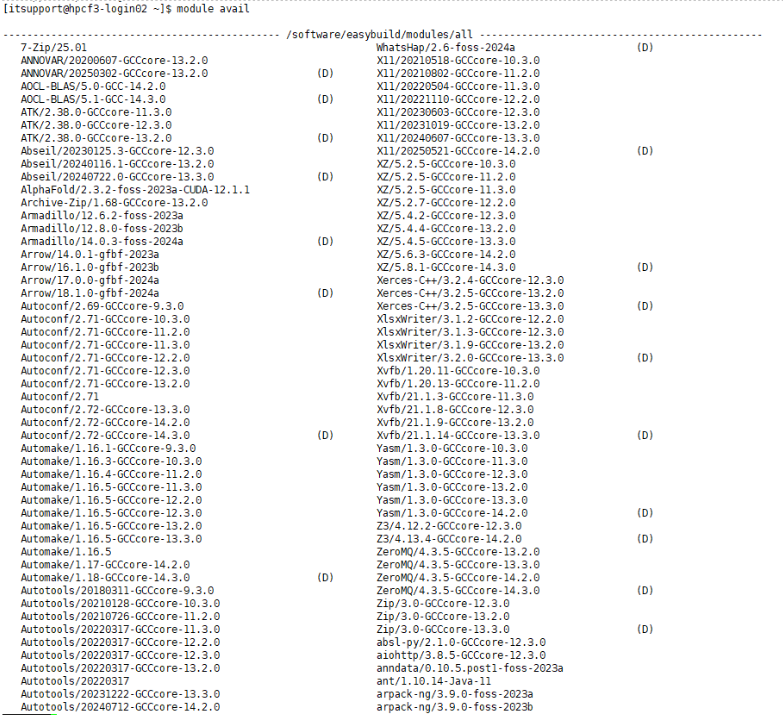
The HPCF3 cluster uses the Environment Modules system to manage centrally installed software. Multiple versions of commonly used bioinformatics tools are already available.
Show Available Modules
Environment Modules allow users to easily load, unload, and switch between different software environments using simple commands.
To check which software packages and versions are available on HPCF3, run:
module avail
This command lists all modules currently installed and ready for use.

Stay tuned. Coming soon.
Job Scheduling System (OpenPBS) at HPCF3 cluster
All jobs must be scheduled via the batch job system (OpenPBS). Jobs are submitted to PBS specifying requested resources, including the queue, number of CPUs, the amount of memory, and the length of time. PBS will then run job(s) on available compute nodes when the resources are available, subject to constraints on maximum resource usage.
Click here for more details.
High Performance Computing Cluster (HPCF2)
⚠️ HPCF2 is decommissioned. New applications are closed. Please use HPCF3 for new requests.
Contact
itsupport.cpos@hku.hk
Core Facilities
Address
6th Floor
The Hong Kong Jockey Club Building
for Interdisciplinary Research
5 Sassoon Road
Pokfulam, Hong Kong
Tel: 2185-5050
Fax: 2818-5653
Web: https://cpos.hku.hk
Email: enquiry.cpos@hku.hk
Office Hours
Mon-Fri: 9:00am – 5:30pm
Samples and goods reception not available 1:00pm – 2:00pm
Closed on Saturday, Sunday, all University and Public holidays.