

項目規劃
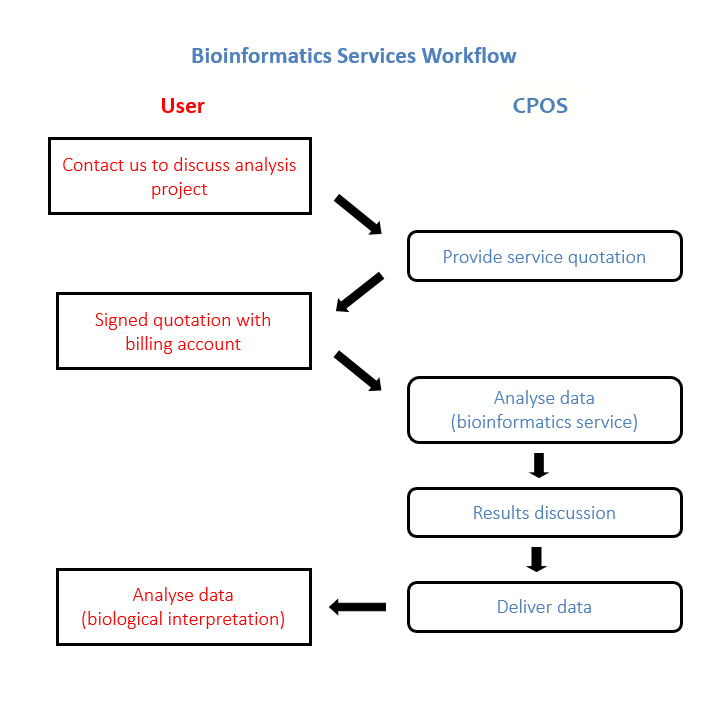
數據分析對任何 NGS 項目都至關重要,因此我們建議提前進行規劃。對於需要我們提供生物訊息學的研究人員,我們強烈建議您在項目規劃的早期階段與我們討論您的項目,以評估可行性並設定合理的預期。
期望事項
我們的 免費 consultation will help you decide on the choices of sequencing technology (see table below), length of read, throughput required (amount of coverage) and analysis methodologies etc. All of these will play an important role in answering your specific scientific questions.
Below table lists some of the typical projects with suitable technologies, but we may discuss any other.
歡迎 現在 聯絡我們以討論您的項目!
| 應用 | Illumina 測序技術,邊合成邊測序 | 單分子實時測序技術 (SMRT) | 可能需要回答的問題 | |
| NovaSeq | MiSeq | PacBio | ||
| 外顯子組測序 | +++ | + | - | 外顯子序列中是否存在新的突變? |
| RNA-Seq | +++ | ++ | + | 我的樣本中哪些基因存在差異表達? 我的樣本之間是否存在不同的剪接模式? |
| 染色質免疫沉澱定序 (ChIP-Seq) | +++ | ++ | - | 我的蛋白質會與哪些序列結合? |
| 從頭全基因組測序 | +++ | +++ | +++ | 這種生物的基因組是什麼樣的? |
| 重測序 | +++ | +++ | + | 我的細菌/病毒/質粒分離株與常見菌株相比,其序列存在哪些差異? |
| 宏基因組學 | +++ | ++ | + | 我的環境樣本中存在哪些微生物? 我的培養物中有哪些不同的病毒株? |
| MicroRNA 表達譜分析 | +++ | ++ | - | 我的樣本中表達了哪些 MicroRNA,或哪些 MicroRNA 存在差異表達? |
| 甲基化分析 | +++ | ++ | + | 基因組中的哪些位點發生了甲基化? 我的樣本之間是否存在不同的甲基化模式? |
工作流程
收費標準
大多數生物訊息學分析都是獨特的,因此服務費用會根據管理您的具體項目所需的時間和資源而有所不同。為便於預算,在了解您的需求後,我們會及時向您提供預估費用的報價。
作為學術性、非牟利中心實驗室,我們與許多其他服務提供商相比,提供極具競爭力的價格。
**重要提示:*如需享受香港大學(HKU)價格,研究人員必須是港大的正式員工,且付款必須通過符合內部轉帳條件的港大內部財務帳戶支付。所有外部資金均須收取管理費(Overhead charge)。
服務選項
在 CPOS,生物訊息學團隊與 NGS 實驗室團隊緊密合作,提供多種服務選項,以滿足您的需求。除測序運行服務外,測序數據在發布給用戶之前均會進行質量控制 (QC)。
除定序運行服務外,定序數據在發放予用戶前均會進行質量控制(QC)。
如需了解根據不同應用所提供的具體交付內容,請參閱數據交付內容(Data Deliverables) 部分。
| 服務類型 | 是否於 CPOS 進行文庫構建? | 是否由 CPOS 負責測序? | 生物訊息學交付內容 | ||||
| 原始測序數據 (去多重) | 測序報告 | FastQC 報告 | 分析報告及其他交付內容 | 中間分析文件 | |||
| 測序運行服務 | 否 | 是 | √ | ||||
| 全流程服務 | 是 | 是 | √ | √ | √ | ||
| 提供標準分析的全流程服務 | 是 | 是 | √ | √ | √ | √ | √ |
| 僅限數據分析 | 否 | 否 | √ | √ |
數據收集
概覽
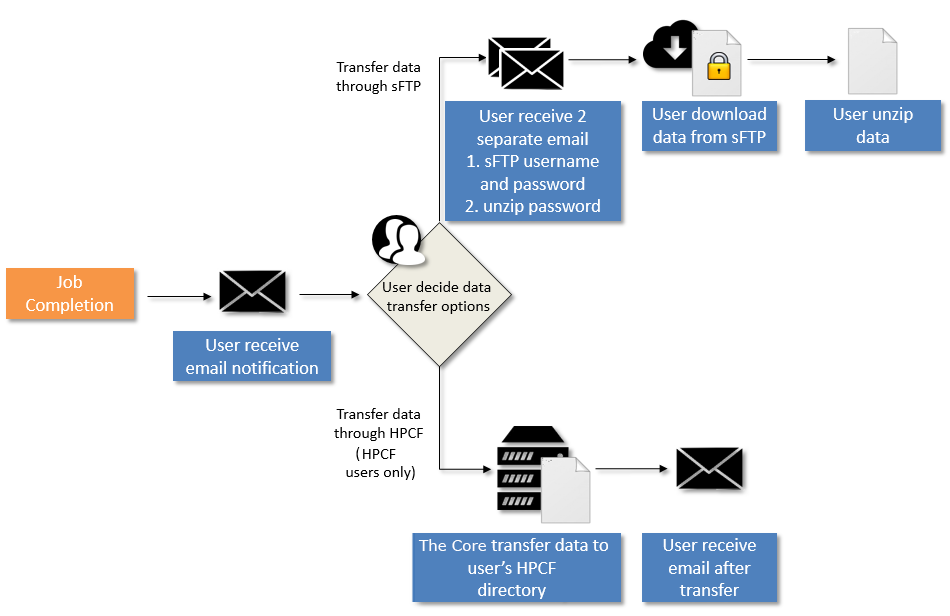
Once data is available, users will be notified via email. Two data transfer options are available:
(I) For all users, data could be downloaded via sFTP server.
- 用戶通過電郵接收 sFTP 用戶名稱及密碼,解壓密碼將於另一封電郵中提供。
- User downloads data from sFTP server. Instructions can be found 按此.
- To unzip files, user can use 7zip or winrar .
(II) For HPCF* users only, data could be transferred directly to user-specified HPCF directories.
- User provides HPCF folder address to the Core.
- The Core notifies user upon completing data transfer through email.
In compliance with the centre’s data protection scheme, analysed data are compressed and encrypted prior to delivery via sFTP server. Username and password to access sFTP server and password to unzip files are provided in separate email for added security. Data could be unzipped using 7zip or winrar.
Due to limited server hard disk space, data will only be kept for 1 month after delivery. Data will then be removed from our servers without prior notice.
Please ensure that you keep a copy of the data (analysis results and all intermediate files) securely and clearly identified for future reference.
*For more information about HPCF, please visit the HPCF section.
數據收集工作流程
How to Download Files from sFTP Server
概要
This section shows how to transfer files from sFTP Server by setting up and logging into Filezilla client as the preferred FTP client. The downloaded files will be split into multiplex files if the size is larger than 250 GB. Please remember to download the md5sum file in the same folder to verify the integrity of the downloaded file later. Due to the instability of Wi-Fi, Wi-Fi is not recommended to use for the download.
操作步驟
- Download and install Filezilla client (https://filezilla-project.org). Note: please download the Filezilla client , NOT the file Filezilla Server.
- 打開 FileZilla,並把以下的資訊輸入至視窗頂部的 Quickconnect 欄。
- Host:您獲得的主機地址
- Username:您獲得的用戶名稱
- Password:您獲得的密碼
- Port number: 22
(The above information can be obtained from the email sent by the bioinformatics service team)

- 點擊 Quickconnect 或按 Enter 連接至服務器。

- 首次登錄時,點擊 OK,接受關於未知主機密鑰的安全證書。

- Click on the file that you wish to download from sFTP Server (window on the right) and then move the file to the destination location on your computer (window on the left). Please note that you will need to click and hold the mouse button during this drag and drop action.
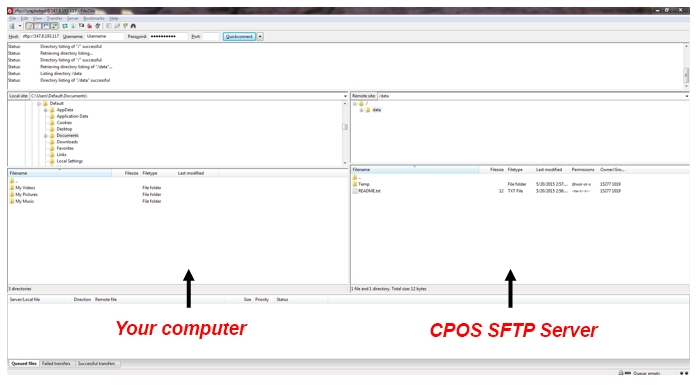
- Upon “dropping” the file into your computer, you will see that the file transfer is in progress (see screen shot below). Please wait for the file transfer to be completed and this will take a while for files that is large in size. Note that the number in the brackets denotes how many files are to be transferred.

- Once the file transfer completed successfully, you will see numbers in the “Successful transfers” tab (see screen shot below). Note that the number in the brackets denotes how many files are transferred successfully.

- 當所有文件均成功下載後,您可以關閉 FileZilla Client,然後使用 md5sum 驗證已下載文件(請參閱下一節)。請務必仔細按照下一步操作,以確認文件已成功下載。
How to Check md5sum of Downloaded Files
概要
本節介紹如何使用 WinMD5Free,通過 MD5(Message-Digest Algorithm 5)哈希值驗證已下載文件的完整性。
操作步驟
- 下載並解壓 WinMD5Free(http://www.winmd5.com)。
- 打開解壓文件夾中的 WinMD5.exe。
- Click on Browse and choose the zip file you have downloaded from sFTP Server, the MD5 checksum value will be computed and shown in Current file MD5 checksum value. Please wait patiently as this process will take a while (up to an hour or more) for file that is large in size.

- 使用 Notepad 打開從 sFTP 服務器下載的 md5sum 文件。複製 MD5 校驗值,並將其粘貼至 WinMD5Free 中的 Original file MD5 checksum value,然後點擊 Verify。
Notepad:  WinMD5Free:
- 如果從 sFTP 服務器下載文件成功,將彈出窗口並顯示「Matched!」。如果顯示「NOT Matched!」,請重新從我們的 sFTP 服務器下載該文件。

- 確認文件已成功下載後,如有需要,您可以使用 7-Zip 解壓文件(請參閱下一節)。
How to Unzip Password Protected Files Downloaded from sFTP Server
概要
This section shows how to unzip the password protected files downloaded from our sFTP server using 7-Zip. Please remember to download all of the split zip files BEFORE attempting to unzip the files.
WARNING: Please ensure you have sufficient disk space to hold all the un-compress data.
操作步驟
- 下載並安裝 7-Zip(http://www.7-zip.org)。
- Right click the zip.001 file you have downloaded from SFTP server, then go 7-Zip and click Extract Here.

- 將彈出窗口要求輸入密碼。請輸入我們通過電子郵件提供的密碼,然後單擊OK。

- An unzipped folder will be extracted at the same location as the original file. Please note that only zip.001 need to be extracted and the remaining zip files (if any) will be unzipped into a single folder.
數據交付內容
典型交付內容
根據測序技術、項目類型以及所需的生物訊息學支持程度數量,交付內容會有所不同。一般包括:
- 測序報告 (MS Word 文件) – 記錄測序作業表現的書面報告。
- FastQC 報告(HTML 文件) – 由 NGS 數據質量品質控制工具生成產生的報告,可通過在網頁瀏覽器查看上檢視(僅限 Illumina 定序測序)。詳情請參閱請瀏覽 作者網站以了解詳情。
- 分析報告及結果(各種檔案文件類型) – 總結分析數據及所採應用分析流程管線的報告。亦包括含專案項目特定的分析結果檔案文件(見下表)。
- 中間分析文件(各種文件類型) – 在分析過程中生成的文件,例如 Fastq 格式的高質量篩選讀段。交付內容取決於項目類型(見下表)。
請選擇以下測序技術類型,以查看交付内容。


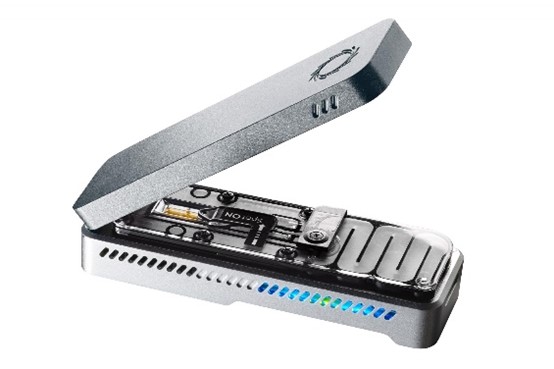
測序 – 根據項目類型提供的具體交付內容
對於超出我們分析流程(標準交付)的分析需求,我們可提供定制化自訂協助(定制化自訂交付項目交付內容)。請注意,以下列表絕非所有可能交付項目交付內容的完整列表。如果您找不到所需的項目內容,請聯絡聯絡我們。
最終交付內容須經由 CPOS 與用戶雙方同意確定。
| 項目類型 | 交付內容 | 定制化 |
| RNA-Seq (mRNA) | - BAM 格式的比對文件 - MS Excel 格式的基因/轉錄本表達水平文件 - *MS Excel 格式的差異表達基因/轉錄本列表(包括整合至 Partek Flow,以進行下游通路分析) - HTML 格式的 PCA 圖(至少 2 個樣本) * 每個提交進行測序的樣本均包括 1 個兩兩比較(pairwise comparison)。如需其他比較,歡迎聯絡我們了解詳情。 | - MS Excel 格式的已註釋 SNP/INDEL 列表 - MS Excel 格式的可變剪接模式(Alternative Splicing Patterns) - MS Excel 格式的融合基因文件 - MS Excel 格式的新型外顯子(Novel Exon)文件 - 其他(可進一步討論) |
| RNA-Seq (miRNA) | - 已知 miRNA 的 BAM 格式比對文件 - 其他已知 RNA(如 snRNA、snoRNA 等)的 BAM 格式比對文件 - MS Excel 格式的 miRNA 表達水平文件 - *MS Excel 格式的差異表達 miRNA 列表 * 每個提交進行測序的樣本均包括 1 個兩兩比較(pairwise comparison)。如需其他比較,歡迎聯絡我們了解詳情。 | - miRNA 靶標預測 - MS Excel 格式的新型 miRNA 文件 - 其他已知 RNA 的表達水平 - 其他(可進一步討論) |
| 染色質免疫沉澱定序 (ChIP-Seq) | - BAM 格式的比對文件 - Excel 格式的 Peak 列表 - Excel 格式的已註釋 Peak 列表 - 用於在 Integrative Genomics Viewer(IGV)中進行 Peak 可視化的 BigWig 文件 * 每個提交進行測序的樣本均包括 1 個兩兩比較(pairwise comparison)。如需其他比較,歡迎聯絡我們了解詳情。 | - 其他(可進一步討論) |
| 人類外顯子組測序 | - BAM 格式的比對文件 - 標準 VCF 格式的 SNP/INDEL 文件 - MS Excel 格式的已註釋 SNP/INDEL 文件列表 * 請單擊此處查看我們用於分析的目標文件。 | - MS Excel 格式的註釋體細胞 SNP / INDEL 清單 - 針對 PHIAL 進行註釋的 MS Excel 格式檔案 - 其他(可進一步討論) |
| 人類全基因組測序 | - BAM 格式的比對文件 - 標準 VCF 格式的 SNP/INDEL/CNV/SV 文件 - MS Excel 格式的已註釋 SNP/INDEL/CNV/SV 文件列表 * 分析將使用 DRAGEN 平台進行。 * 對於體細胞 CNV 檢測(somatic CNV calling),需要提供匹配的正常樣本(matched normal sample)。如需詳細信息,請聯絡我們。 | - 其他(可進一步討論) |
| 亞硫酸氫鹽測序 | - BAM 格式的比對文件(人類及 Lambda,如適用) - Text/Excel 格式的已註釋 CpG 甲基化位點列表 - Lambda 的亞硫酸氫鹽轉化率(如適用) | - 其他(可進一步討論) |
| 從頭基因組測序 | - 多種格式的從頭組裝文件(原始文件及 contigs) - Text 格式的預測編碼基因文件 - Text 格式的已註釋編碼基因列表 - Text 格式的重複序列列表 - Text 格式的非編碼 RNA 列表 | - 用於基因組可視化的 Circos 圖 - 其他(可進一步討論) |
| 從頭轉錄組測序 | - 多種格式的從頭組裝文件(原始文件及 contigs) - FASTA 格式的轉錄本列表 - Excel 格式的已註釋轉錄本(GO)列表 - Excel 格式的基因/轉錄本表達水平文件 - *Excel 格式的差異表達基因/轉錄本列表 * 每個提交進行測序的樣本均包括 1 個兩兩比較(pairwise comparison)。如需其他比較,歡迎聯絡我們了解詳情。 | - 其他(可進一步討論) |
| 宏基因組測序(全基因組鳥槍法) | - 多種格式的從頭組裝文件(原始文件及 contigs)
- 原始 BLAST 文件(原生 BLAST 格式) - 分類學樹(Taxonomy Tree) - Excel 格式的物種組成 | - 其他(可進一步討論) |
| 宏基因組測序 (16s 擴增子) | - FASTA 格式的合併雙端讀取序列(Joined Paired-End Reads)
- BIOM 格式的 OTU 表 - *分類學摘要(Taxonomy Summary) - *Alpha 多樣性分析結果(樣本組內的多樣性) -* Beta 多樣性分析結果(樣本組之間的多樣性比較) - *Excel 格式的差異 OTU 列表 * 每個項目包括 6 個組間比較(between-group comparisons)。如需其他比較,歡迎聯絡我們了解詳情。 | - 其他(可進一步討論) |
Pacbio Sequencing – Specific Deliverables Based On Project Type
對於超出我們分析流程(標準交付)的分析需求,我們可提供定制化自訂協助(定制化自訂交付項目交付內容)。請注意,以下列表絕非所有可能交付項目交付內容的完整列表。如果您找不到所需的項目內容,請聯絡聯絡我們。
最終交付內容須經由 CPOS 與用戶雙方同意確定。
| 項目類型 | 交付內容 | 定制化 |
| 從頭基因組測序 | - 多種格式的從頭組裝文件(原始文件及 contigs) - Text 格式的預測編碼基因文件 - Text 格式的已註釋編碼基因列表 - Text 格式的重複序列列表 - Text 格式的非編碼 RNA 列表 | - 用於基因組可視化的 Circos 圖 - 其他(可進一步討論) |
| 長距離結構變異 | - BAM 格式的比對文件 - Excel 格式的結構變異列表 | - 其他(可進一步討論) |
下載
與 CPOS 開發的分析流程一起,我們還積累了一些對各種數據分析有用的資源。為方便其他生物訊息學研究人員使用,這些資源將通過本網站提供。
外顯子靶區域
The BED files were generated by merging the target and probe regions (provided by vendor), followed by adding 200bp padded region (100bp upstream and 100bp downstream). Conversion from hg19 to hg38 was done using Batch Coordinate Conversion (liftOver) from UCSC Genome Browser Utilities. The workflow is shown as below:
以下鏈接可下載採用 BED 格式的填充合併區域:

以下鏈接可下載採用 BED 格式的填充合併區域:
SeqCap EZ Exome + UTR1
[ hg19 MD5:2de06c08d21a97642c1a50ac609c32b2 ] [ hg38 MD5:c83c85ea28546ca58e06005ad752741d ]
1The original target and probe region files can be downloaded 按此.
xGen® Exome Research Panel v1.02
[ hg19 MD5:c79c2a7e3d9ba77b3c4f2f9e3eebce1b ] [ hg38 MD5:380d6ca15ee5d76d54ab1d843e31d49b ]
2The original target and probe region files can be downloaded 按此 [MD5:1408942505230683c79955ddaae90e46].
服務條款
在 CPOS,我們致力於針對您的數據採用最合適的分析方法,並確保在項目開始前對分析步驟進行周詳規劃。由於 CPOS 提供免費諮詢服務(,包括合適的分析方法和工具提供建議),我們敦促用戶提前與我們討論。我們將本著誠信原則,根據我們的專業知識提供建議,但對於最合適的分析方法不承擔全部責任。CPOS 分析團隊與項目主要研究員應在充分相互理解的基礎上達成一致,以便共同分擔相關責任。
數據處理
所有數據均儲存於聯網存儲驅動器中,並定期進行備份,但 CPOS 不負責永久儲存數據。由 CPOS 生物訊息學設施存儲的所有數據(原始數據、分析結果及所有中間文件)可能會在向用戶交付數據後 1 個月後被刪除,恕不另行通知。建議用戶妥善保存一份清晰標識的數據集永久副本。
致謝/作者署名
我們感謝您在利用本中心生成的數據發表的科研成果中對泛組學科研中心 (CPOS) 予以致謝。我們將深表感謝。如果提供了重要的智力貢獻,則適合列爲作者。適當的致謝有助於記錄我們工作的影響,並有助於支持繼續提供獲補貼的服務項目。非常感謝。
聯絡我們
bioinfo.cpos@hku.hk

地址
香港薄扶林
沙宣道 5 號
香港賽馬會跨學科研究大樓 6 樓
電話:2831-5500
傳真:2818-5653
網址:https://cpos.hku.hk
電郵: enquiry.cpos@hku.hk
辦公時間
星期一至五:上午九時至下午五時半
當中下午一時至兩時 - 不設樣本及貨品接收
星期六、日、大學假期和公眾假期休息

